Part 5 · How robots are programmed
37Safety: limits, stops, and why robots are slow near people
A desk-sized arm swings its hand across the table with a person standing in the way, and hits them at full speed. Switch on a limit, a speed limit and a stop on touch, and find what each one saves and what it costs.
This assumes: Stiff or soft: holding an egg without breaking it, Joints: the ones that turn and the ones that slide. About 9 minutes of reading.
Every robot in this course so far has had the room to itself. The rover steered around boxes and the arm planned its way over a wall, but a box and a wall are things. Nothing in thirty-six modules could tell a table leg from a human one, and nothing was asked to. This module puts a person in the room. The arm below is about to swing its hand across its table, someone is standing where the hand is going, and the arm does not know.
What happens next depends on three switches. Each is one of the ways real robots are kept from hurting people, and each one costs something.
Why an arm is dangerous at all
There are two reasons. The gravity and momentum module said a moving arm carries momentum, its mass times its speed, and whatever the arm meets has to take that momentum away. The less time that takes, the bigger the force, which is why walking into a door hurts and leaning on one does not. A hit is an arm's momentum taken away in a few thousandths of a second.
The second reason is the controller. Every arm in this course is sent to a position and pushes until it gets there. The proportional control module called the gap between where a joint is and where it was sent the error, and showed the push growing with the error until the motor was giving all it had. An arm that has been stopped by a person is an arm with a large error, and it pushes with everything its motor has.
The SO-101 here is the size of a desk lamp. An arm that welds car bodies can weigh a ton and move its tip at several meters a second, under the same kind of controller, which is why factory robots have traditionally worked alone inside a fence.
The box
The arm is stretched out straight, its fingertips 39 centimeters from the shoulder turn, the joint in its base that swings the whole arm round. It starts turned 60 degrees to its left, at the left of the picture. Run puts it back there and sends the shoulder turn to 60 degrees the other way, a swing right across the table. No speed is asked for: the target jumps to the far side, and the motor swings the arm as fast as it can.
A person stands in the way, life-sized, 1.6 meters tall. The arm's table is drawn at floor level, so they are standing on it, and the hand, 25 centimeters up, is at the height of their shin. They do not flinch or step back, on purpose: the case safety engineers plan for is the person who cannot get out of the way.
Three switches sit under Run, all off to start. Under them a line says what the arm is doing, and when it hits the person, how long after setting off and how fast. A bold line keeps this run's numbers: the hand's top speed, the hardest push on the person at any instant, and how hard the arm is pushing on them now. Flipping a switch puts the arm back at the start.
This is easier on a larger screen, but it works here too.
The hit, and the push after it
A hundred and forty-three newtons is the weight of about fourteen and a half kilograms, a full suitcase, landing for an instant on the edge of the arm's gripper. The standard that robots meant to work beside people are built to, written from a study of where volunteers first felt pain, lets such a robot squeeze a trapped hand with no more than 140 newtons. A knock on a shin is not a squeeze on a hand, and the standard has a number for each. But that is the size of force where its lines are drawn, and a desk lamp reached it.
The worst of the hit was over within five thousandths of a second. What came after is quieter and, on a bigger robot, worse. The arm is still pushing with 9 newtons, and it will go on for as long as you leave it. The controller was sent to the far side, the person is holding it short, and so the motor gives all it has, which the proportional control module called saturated. All it has is 2.94 newton meters of torque, and a torque is a push times its distance from the joint. The side of the hand met the leg about 32 centimeters out, a little short of the fingertips, and 2.94 divided by 0.32 is 9, a firm prod. The same behavior from a motor a thousand times stronger is a person pinned against a machine.
Stops
The oldest safeguard is the emergency stop: the red mushroom-shaped button on every industrial robot and on the wall beside it, which cuts the motors and puts the brakes on whatever the program is doing. A quarter of a second is about the best anyone manages with a finger on the button, waiting. Somebody surprised, who has to notice, understand and then reach for the button, takes a second or more. The hand arrived in four tenths.
So robots are given stops they trigger themselves. A stop of that kind is called a protective stop. One kind watches the space around the robot: a curtain of light beams across the opening in the fence, or a scanner sweeping the floor, and anything that breaks a beam stops the robot. Another kind watches the arm itself. An arm knows how hard each motor is pushing, from the current it draws, as the touch and force module showed, and how fast each joint is turning. So it knows how a swing through empty air should go, and a joint that stops short while its motor is still pushing has met something. The arm stops, and backs off a little so that nothing is left pressed. That is the switch labeled Stop on touch. With it on the hit is the same, 143 newtons, but then the arm feels the touch, stops and backs off, and pushing now falls to 0.
What a stop cannot do
The stop does its job: nobody is left pinned. In the box it acts a hundredth of a second after the touch. And the hardest push is still 143 newtons, because the worst of a hit comes in its first few thousandths of a second, before even that stop. A stop that waits for a touch decides how long the push lasts. How hard the hit was is the arm's momentum, settled before anything touched.
Nor does any stop bring an arm to rest at once. Brakes and motors need time to take a moving arm's momentum away too, and in that time the arm keeps traveling. How far it goes is its stopping distance, and the faster it was going, the further that is. It is why a light curtain stands well out from the robot: someone who breaks the beam keeps walking while the arm is still stopping.
Slow
So if a hit is to be small, the arm has to be slow before it happens. With the Speed limit on, the controller no longer sends the target to the far side in one jump. It walks the target across at the pace that moves the hand 25 centimeters a second, and the arm follows it.
The same arm, the same person and the same stop, and a fifth of the force. The speed fell further than that, to about a seventh, and the force did not quite keep step because part of every hit is the motor's own push, the 9 newtons that would be there however slowly the hand arrived. Less speed is less momentum, a shorter stopping distance, and more time for everybody. The price: the hand took two seconds to reach the person instead of four tenths, and every job this arm does is slowed the same way.
The standard that industrial robots are built to says that when a trained person is inside the fence teaching the robot a new job, its tip may move no faster than 250 millimeters a second. That is not a promise that a hit at that speed is harmless: a one-ton arm still carries a great deal of momentum. It is a speed at which a person who is watching can step back.
Limits
The last safeguard is the bluntest: do not let the arm go where the person is. The joints module met the joint limit, the peg a joint cannot turn past. A software limit is the same idea written into the controller instead of built in metal: an angle the joint's target may never pass, wherever the program tries to send it.
Nothing was hit, at full speed, with nothing sensed and nothing felt. That is the virtue of a limit, and of the fence it stands in for: it does not depend on noticing anybody. It does depend on the stopping distance. The line says the arm swung 5 degrees past its limit before the motor hauled it back. The hand met the leg at 16 degrees, so a limit at 0 leaves room for that, and one at 15 would not. The price is the far side of the table, gone whether a person is standing there or not.
Layers
No one of the three is enough, so real robots stack them, each covering the hole in another: limits to keep the arm out of the places where people stand, slowness wherever a person can still be reached, a stop on touch for when both fail, and the red button for whatever nobody thought of.
A collaborative robot is an arm built from the start to work beside people with no fence, and it is that stack made into a machine. It is light, so there is less mass in its momentum. Its edges are rounded and often padded, because a soft surface takes longer to stop the arm and a longer stop is a smaller force. It moves slowly, and it stops when its motors feel a touch. The compliance of the stiff or soft module belongs here too: a soft joint gives when it meets someone, so the push that follows a bump is a nudge. It works beside the rest, not instead of them, because the first instant of a hit is over before any controller can give way. What such a robot gives up is speed and strength.
What the simulation leaves out
The person here is a rigid mannequin fixed to the floor. A real leg gives a little and a real person steps back, and both make a hit smaller. A hand trapped against a table, or a head, makes it far worse.
The arm in the box is handed the size of the push by the simulation, and counts anything over 2 newtons as a touch. A real arm has to work the push out from motor currents that jitter, so the smallest push it can count as a touch has to sit above the jitter. And real safeguards are built double, two circuits checking each other, because a stop that has failed without anyone knowing is worse than no stop: people trust it.
Watch
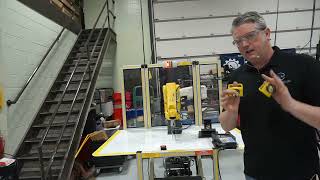
Fanuc Robot Safety — Andrew Dahlen (9:12 of it, starting at 1:13)
- Why this video
- The words name a fence, a curtain of light, a scanner sweeping the floor, a red button and a speed of 250 millimeters a second. Here an instructor stands beside a real factory robot and shows each of them. This robot has no cage in front of it. A laser scanner under its table watches the floor instead, and when he steps toward the moving arm it stops before he can reach it, twice, the second time with the robot at full speed. He holds a real gate switch, and explains a light curtain as the beam under a garage door many times over. Then the camera goes to the robot's controller: the red emergency stop, and beside it the switch for teaching mode, marked less than 250 millimeters per second, this page's Speed limit. What it does not show is a touch: nothing in it hits a person and stops, which is this page's third switch.
- What to watch for
- At 1:18 he steps toward the moving arm and at 1:22 it clicks and stops. At 1:39 the camera finds the reason, a yellow laser scanner under the robot's table, and at 2:16 its light turns red as he comes near and green as he backs away. At 2:35 he says what cages are for: keeping the people out. At 3:53 he holds up a door interlock, the switch that stops a robot when its gate opens, and at 4:26 tells how maintenance people defeat it by leaving its key in. At 5:15 a light curtain is the beam under a garage door, many times over. At 8:57 he steps in close to the robot running at full speed, and at 8:59 it has stopped: the scanner saw his legs. At 9:27 the camera is on the red emergency stop, and at 9:38 he reads the label beside it: less than 250 millimeters per second in teaching mode.
Words introduced
- emergency stop
- The red button on a robot and on the wall beside it that cuts the motors and puts the brakes on, whatever the program is doing. It needs a person to notice the danger and press it, and a surprised person takes longer over that than a fast arm takes to arrive.
- protective stop
- A stop the robot triggers itself, from its own sensors, with nobody pressing anything. A beam of light broken by someone walking in, or a joint that stops short while its motor is still pushing, stops the arm.
- stopping distance
- How far a moving robot travels between being told to stop and standing still. Its momentum has to be taken away first, so the faster it was going, the further it goes.
- software limit
- An angle written into the controller that a joint's target may never pass, wherever the program tries to send it. It keeps the arm out of a place, such as where a person stands, at the cost of the arm never being able to work there. It has to be set short of that place, because a moving arm swings a little past its target before it stops.
- collaborative robot
- A robot arm built to work beside people with no fence. It is light, rounded and slow, and it stops when its motors feel a touch, so that the hit it could give is small and the push after it is short.
Where next
Suggested next: 38. Teaching by showing: imitation learning