Part 5 · How robots are programmed
34Writing the sense-think-act loop yourself
The first module called the cycle behind a vacuum meeting a chair leg the sense-think-act loop. This module writes it: thirteen lines that drive the rover and, five times a second, read the front rangefinder and turn if something is under forty centimeters.
This assumes: Telling a robot what to do: commands, loops, timing, Measuring distance: sonar and lidar. About 9 minutes of reading.
The first module watched a robot vacuum meet a chair leg and turn, and called the cycle behind it the sense-think-act loop: sense, decide, act, and round again. This module writes that loop. The rover is back in its pen, seen from the pen's south side and above it as in the distance-sensors module, with a box in its way, and under it is a thirteen-line program. The last module's program read nothing but its own joint; this one reads a sensor five times a second, and what it does next depends on what it read. Its loop has no count, so no number of rounds ends it. And the beacon stands unused in the far corner: the program has no command for asking where it is, so this rover drives, and avoids.
The program
setWheels(1, 1)
every(0.2, () => {
  if (readTouch()) {
    say("Bumped. Stopping")
    stop()
  }
  if (readDistance("front") < 0.4) {
    say("Something ahead at", readDistance("front"), "m. Turning")
    setWheels(-1, 1)
    waitFor(0.6)
    setWheels(1, 1)
  }
})
Line 1 starts the wheels: setWheels takes two numbers, the left wheel's speed and then the
right's, each from −1 for full speed backward to 1 for full speed forward. Full speed here is about
forty centimeters a second. Unlike moveJoint, this command does not wait. A wheel is a hinge with
no limit, made to go round and round, so the useful thing to tell it is how fast, not where; a
speed is not a place to arrive at, so the program goes straight on to line 2, and the wheels keep
that speed until another setWheels changes it.
Line 2 is the loop. every(0.2, …) runs the lines inside its curly brackets, waits until a fifth
of a second has passed since that round began, and runs them again, round after round, with no
count. The () => { and the }) on line 13 are the last module's fence; everything between them
is one round.
Lines 3 to 6 are the first thing each round does. if is new: it is a condition, a test that
comes out true or false, with some lines that run only when it is true. The test sits in the round
brackets, the lines in the curly ones. readTouch() asks the bumper on the rover's nose whether it
is pressed against something and hands back true or false; the empty brackets mean it needs nothing
told to it, and stop() is the same. When it is true, line 4 says so and line 5, stop(), ends
the program. When it is false, lines 4 and 5 are skipped and the round goes on to line 7. On a good
run they never run; they are there for when something has gone wrong.
Lines 7 to 12 are the loop's real work. readDistance("front") asks the middle one of the five
rangefinders, the one looking straight ahead, and hands back the distance in meters to the first
thing on its line, or the word Infinity when nothing is within its reach of a meter and a half. The
< compares: the test is true when that distance is less than 0.4, and Infinity counts as bigger
than any number, so with nothing in reach the test is false. The 0.4 is the threshold, the
number the condition compares the reading against; where it sits decides how close the rover lets
things come. When the test is true, line 8 reads the distance again and says it. Line 9 sets the
left wheel backward and the right wheel forward: the two sides of the rover are pushed opposite
ways, so it spins on the spot, toward the side going backward, its left. Line 10 holds that for six
tenths of a second, which turns it about a hundred and forty degrees, a bit short of facing back
the way it came; line 11 sets both wheels forward again. When the test is false, nothing in the
brackets runs, the round is over, and the loop waits out the rest of its fifth of a second.
Sense, think, act, and how often
Lay the first module's loop over the program and every piece has a line. Sense is lines 3 and 7, the readings. Think is the two conditions: a pressed bumper means stop, under forty centimeters means turn. Act is lines 9 to 11, and line 1 before the loop starts. The loop itself is line 2. Lines 4 and 8 are the robot telling you what it decided, and line 5 ends the program; they are for you, not for the loop. There is nothing else in the program.
Line 2 fixes something the first module did not say: how often the loop goes round. Five times a second is this loop's loop rate. The robot notices the world only when a round begins; between rounds it is deaf and blind, and at forty centimeters a second, a fifth of a second is eight centimeters of travel. So the rover does not turn at exactly 0.40 m: one round reads 0.44 and does nothing, the next reads 0.36 and turns, and the turn is called somewhere in that gap of eight centimeters. The threshold has to be far enough out that eight centimeters of travel, and the swing of the rover's own corners as it spins, never carry it into the box; the rover is a quarter of a meter long, so a corner swings out about fifteen centimeters. Forty is plenty.
The rule about waiting
The last module promised a loop with no count a rule of its own about waiting, and every is it.
The lines inside take whatever time they take, and the loop waits only for what is left of its
period, the 0.2 on line 2. A round that finds nothing ahead is over in an instant and waits nearly
the full fifth of a second. A round that turns takes six tenths of a second, longer than the
period, so there is nothing left to wait and the next round starts at once. While the rover is
spinning nothing is read, because the loop does not interrupt its own round.
This loop has no count, so what ends it? Three things can: the program itself, through stop() on
line 5, if the bumper is ever pressed; you, with the Stop button; or the page, which stops any
program here after thirty seconds. However it ends, the page stops the wheels and says so. A real
robot's wheels keep the last speed they were given until told another, so a real program's last
line is usually a stop.
The box
You are looking down on the pen from its south side. The rover starts at the bottom left, facing right, with the box ahead of it on its line, and the beacon's post stands unused at the top right. The floor is a shade darker than before, and the rover leaves the lighter floor behind it wherever it has been, as a vacuum leaves a clean strip. Under the picture are the program, Run and Stop, a line saying what the program is doing, everything it has said with its time, the five rangefinders' numbers and the bumper, live, and a folded list of the commands.
Run starts the program from line 1 wherever the rover is standing; Reset puts it back at the start and leaves the program as you wrote it, so the tries start with Reset.
This is easier on a larger screen, but it works here too.
What you saw
The first run was the loop working. Eight times the front beam's number dropped under the threshold, eight times the condition came out true, and the rover turned and drove on; in between it went round about a hundred and forty times with nothing to do. The turns were called at 0.39, 0.32, 0.35 and so on, never at 0.40, because each look came eight centimeters after the last and the threshold fell somewhere in the gap. And the program never ended on its own; the page ended it.
The second try changed one number, and it was not the threshold or the turn. The condition was right, the turn was right, and the rover drove into the box anyway, because the loop looked at the world once and then not again for three seconds, in which the box came a meter closer. A loop that looks too seldom is the first module's Sensing switch turned off, written as a number: the program had the sensor and never got round to reading it. The bumper's condition did its one job; a real vacuum's bumper is the same last resort.
The third try weakened the act instead, and the loop forgave it. A turn of fifty degrees often left the wall still in front; the next round saw it, still under 0.40, and turned again, and two or three rounds did what one used to. The lesson: a loop that looks often can get away with small, clumsy acts, because the next look catches what the last act missed. A loop that looks seldom cannot be saved by a bigger act, because by the time it looks the world has moved on. Sensing often is worth more than acting well.
The small turn still loses in the end, because the program reads one beam. A turn that stops with a wall's corner beside the nose leaves something there that the side beams report, as the live line shows, and line 7 never asks them; the next straight run drags the side along it until the bumper is pressed by whatever the side finally meets. A program that reads one beam knows about one line.
What it is for
This loop is close to the whole program of the first robot vacuums, before they carried maps: drive, and when the bumper or a distance sensor says something is there, back off and turn. The rover that dodged a sliding box earlier in this course, and the vacuum that looked for its dock, ran loops of this shape with more inside them: five beams and a sum, or a set of rules for each situation and a test for when to swap. Every robot in this course that reacts to the world has a loop like line 2 in it, and the first question an engineer asks about one is the one you changed in the second try: how often does it go round. A drone's loop runs hundreds of times a second, because a drone tips in a hundredth of one; a vacuum's can run ten times a second, because a chair leg is not going anywhere.
What the simulation leaves out
The rangefinder here reads the truth to the centimeter, so a threshold of 0.4 is a clean line; a
real one wobbles by a few centimeters, as the distance-sensors module showed, and a program that
turned on one reading would sometimes turn at nothing. The pivot here comes out at the same angle
every time; a real rover's turn depends on its battery, floor and tires, so a program that needs a
particular angle reads the wheels rather than counting on six tenths of a second. And every keeps
its time exactly; on a real robot a round that runs late is a round in which the robot was blind
for longer than anyone planned.
Watch
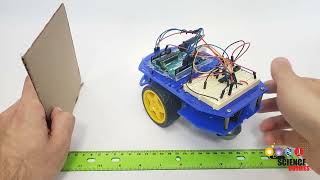
Arduino Self-Driving Car Lesson 5: Detecting Obstacles — Science Buddies (6:13 of it, starting at 12:18)
- Why this video
- A real car on a table, a teacher, and this page's loop in its plainest form: take a reading from the distance sensor on the car's nose, and if it is under the threshold, stop; otherwise drive on. He reads that if-else aloud over the code, then does the one thing the words can only simulate: he leaves a one-second wait inside the loop, asks you why that could be a problem, and runs the car at a piece of cardboard. It drives past its own 20-centimeter line and nearly into the cardboard, because the loop was not looking; with the wait set to zero it stops short. That is this page's second try, on a robot you could build for the price of a kit, and at the end the car does what the rover on this page does: stops, turns around, and drives off the other way.
- What to watch for
- At 12:50 the loop: a reading from the sensor into a number of centimeters. At 13:30 the if-else, "if the measured centimeter value is less than the threshold... stop driving, else... keep driving forward", which is lines 7 to 12 of this page with stop in place of turn. At 14:25 the catch: the drive-forward command has a one-second wait inside it, so the loop "is getting stuck here for a whole second before it checks this condition again" (15:19). At 15:57 the real car, set to stop at 20 centimeters, with that wait still in; at 16:19 watch how far past the line it gets before it stops, and at 16:28 the same run with the wait set to zero. At 18:15 he shows a car that stops, turns around and drives the other way. Until 15:57 the code runs in a browser simulator wired like the real car.
Words introduced
- condition
- A test in a program that comes out true or false, with some lines that run only when it is true. Written as if, a test in round brackets, and the lines in curly brackets; when the test is false the lines are skipped and the program goes on after them.
- threshold
- The number a condition compares a reading against, such as 0.4 meters. On one side of it the program does one thing, on the other side another, so where the threshold sits decides how early the robot reacts.
- loop rate
- How many times a second a loop goes round. The robot notices the world only when its loop comes round, so the loop rate sets how far the world can change before the robot can respond.
Where next
Suggested next: 35. How real robot software is organized: nodes and messages